Area Hierarchy
The Area Hierarchies section is designed to manage the nested geographic levels used for data filtering and drill-down analysis within the dashboard.
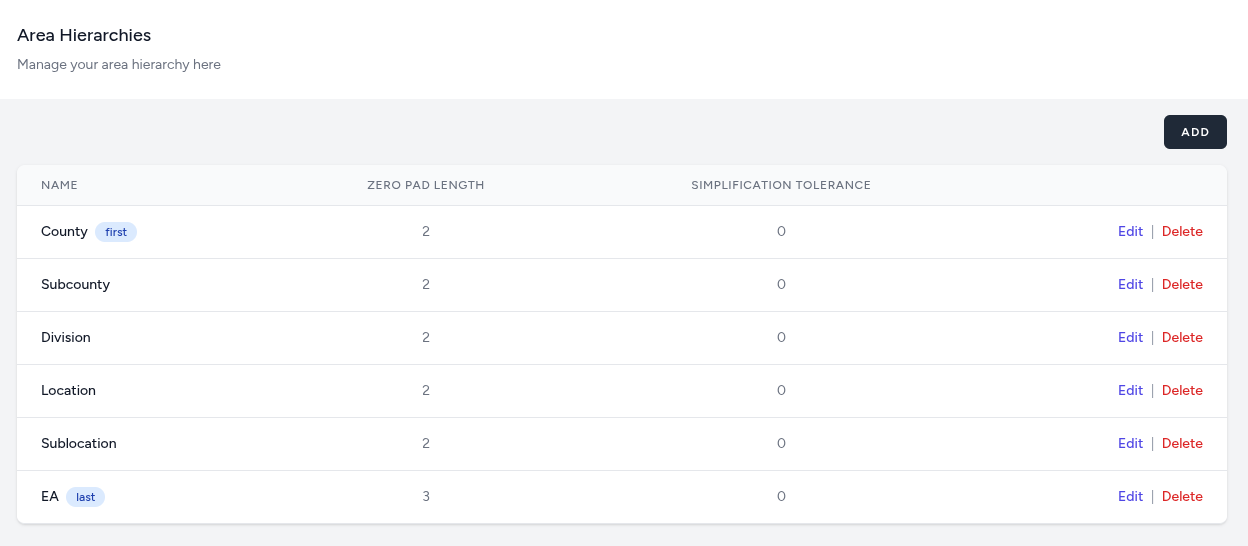
Area Hierarchies Overview
The main management screen provides a tabular view of your current geographic structure.
The table displays the defined levels in order, typically ranging from the highest level (e.g., County) marked as "first," down to the lowest level (e.g., EA) marked as "last."
From this view, administrators can Edit existing levels, Delete obsolete ones, or use the Add button to introduce a new tier to the hierarchy.
Area Hierarchy Configuration Form
When adding or editing a specific hierarchy level, the following parameters must be defined:
-
Name: The descriptive label for the geographic level.
-
Zero Pad Length: The fixed character length for codes at this level. The internal data engine will apply this padding to ensure that queries match the desired data from the source. Note: Set this value to 0 if no zero-padding is required.
-
Simplification Tolerance: The setting used for geographic boundary rendering. Simplification is the process of reducing the geometric detail of a spatial boundary (like a polygon or line) while retaining its essential shape, making it more efficient for large-scale mapping and visualization.
Higher values reduce the number of vertices in a map shape, which can significantly improve dashboard loading speeds for complex geographic regions.
Note: Set this value to 0 for no simplification (highest detail).
This is usually a one-time setup. Changing hierarchy mid-census can cause data inconsistencies.